
From visit to payroll

Simple timesheets for mobile teams

Your team enter their hours, mileage, expenses and time off, a reviewer checks them, then downloads everything payroll needs.

Domiciliary care and supported living services, support workers, community outreach teams, charities and social enterprises, cleaning crews, and other teams whose staff work at clients' locations.

Pricing

Pay for recorded hours, not for people

Most timesheet products charge for each person, so a member of staff who does two visits a week costs the same as a full-timer. We count recorded hours instead, so someone who works a little adds a little to the bill.

Your first 1,000 recorded hours each year
Free
Your first 2,000, for a UK registered charity
Free
Each further 1,000 recorded hours
£39

A block of hours lasts a year from the day it is added. Nothing is charged until you run out, and we tell you before that happens. Every price includes every feature and every role, however many people you invite. There is no setup fee, and we do not ask for card details to start. Hours are counted across the whole organisation. The setup page says what counts towards them.

Get started
Why Visitsheet

Staff enter their own hours and nobody is tracked

Staff enter their hours, miles and expenses, and the office checks them before finalising the period. There is no clock in or out, no GPS stamp and no map of where anyone is. Receipt photos have their location data removed before upload.

It is for teams whose staff work at clients' locations and need only the records that reach payroll. If you already use a rota or workforce-management app, keep it and use Visitsheet alongside it.

Compare what Visitsheet does with what it leaves to something else
What Visitsheet doesWhat it leaves to something else
Hours per visit and activityRotas, shift planning and cover
Three types of mileage on every timesheetLocation tracking and clock-in checks
Expenses with receipt photos, added to the period totalInvoicing, billing and running the payroll itself
Time off requests, approvals and a calendarCare plans, visit notes and anything clinical
A sign-in link by WhatsApp or text, with no app store downloadStaff messaging and company news
A finalised period as a summary file and a detail fileHR records, contracts and training logs
Privacy and trust

How Visitsheet looks after staff and client records

Staff only see their own clients

Each member of staff sees only the clients they are assigned to visit, and nobody else on your list.

Nothing is tracked or sold

No analytics, no advertising and no trackers, and we never sell anything your team enters.

Backed up off-site every night

Every night your data is encrypted on our server and copied to storage run by another company.

Finalised figures stay fixed

Entries can be corrected until the pay period is finalised. After that only an administrator can reopen it, and Visitsheet records who reopened it and why.

What it does

Hours, mileage and expenses for care staff and support workers

Record a visit in a few taps

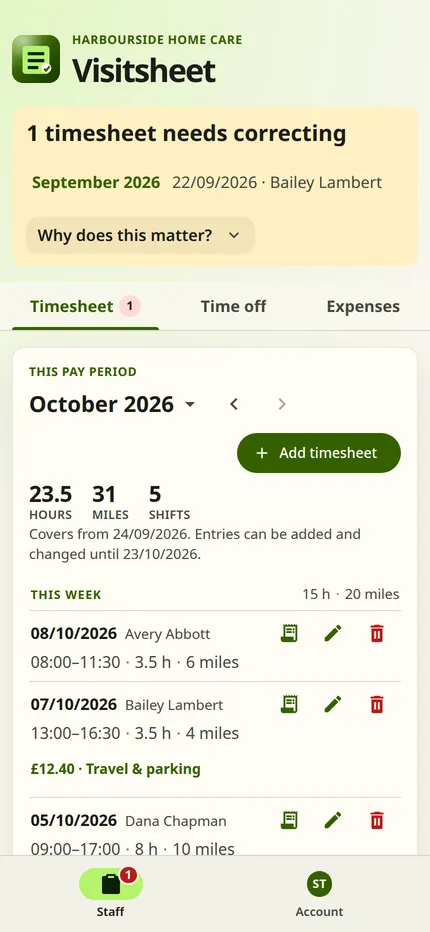
Assign the time to a client or an activity, enter the times and Visitsheet works out the hours. Commute miles, miles between clients and trips on a client's behalf each have their own box, so payroll can apply the right rate.

A woman opens her blue front door and smiles at the person arriving.
Photograph: Centre for Ageing Better

Request and approve time off

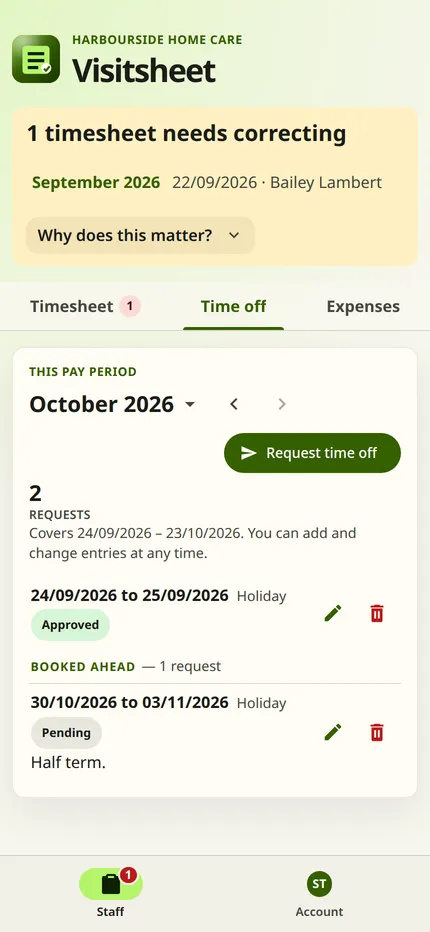
Staff request holiday, sickness or other time off. Reviewers see outstanding requests and check the calendar to arrange cover.

The Time off tab on a phone. It shows 2 requests: a current holiday marked Approved and a booked-ahead holiday marked Pending, each with a pencil to amend and a bin to delete beside it.

Expenses with a photo of the receipt

Staff log a car park ticket or shopping for a client as it happens, and the total goes into that period's payroll figures.

Two women choose groceries together in a shop, holding a loaf beside their shopping basket.
Photograph: Centre for Ageing Better

Prepare payroll in one download

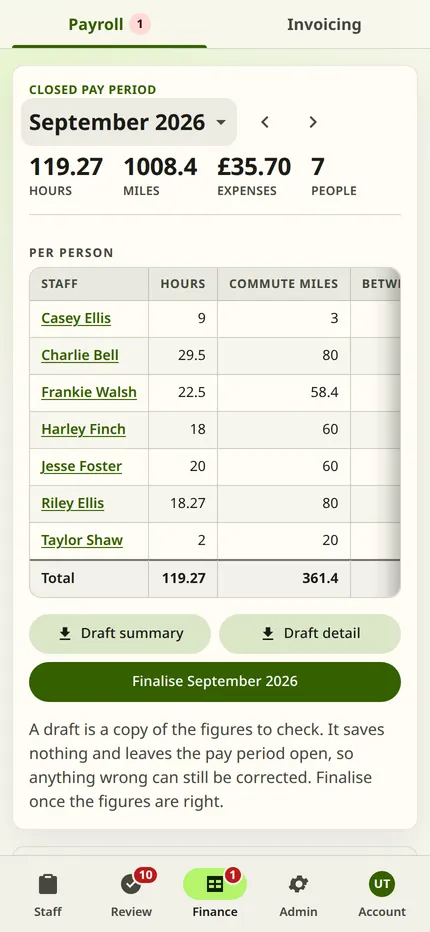
Choose a pay period to see each person's hours, mileage and expenses. Download a draft to check, then finalise it and the figures are fixed.

A man sits at a desk working through paperwork beside a computer.
Photograph: Centre for Ageing Better

Set up new staff by WhatsApp or text

New starters get a sign-in link by WhatsApp or text and add Visitsheet to their home screen, with no app store download. Assign their clients and they can record their first visit that day.

The Admin page. It lists the staff with their roles and their setup status, and has a button to add staff.
Get started

Try Visitsheet with your own team

Set up your organisation, invite your staff and record real visits. It costs nothing to start.

Get started